
I’ve spent the last month living with the MacBook Neo, and honestly? It’s a cracking little machine. But as much as I love the portability, there’s only so much serious work you can do hunched over a laptop at the kitchen table.
I wanted a “home base.” A proper, grown-up workstation where I could just sit down and get stuck in. But I also didn’t want to spend a fortune, and I certainly didn’t want a desk buried under a mountain of cables.
So, I set myself a challenge: Could I build a full-blown, 4K professional setup for under £1,000, including the computer?
It turns out, you absolutely can. And the result is a bit of a dream.
The Magic of the “Single Cable”
This is the part that still makes me grin every time I sit down. I have one single USB-C cable sitting on my desk. I walk in, plug it into the Neo, and—magic.
The laptop starts charging, the keyboard and mouse wake up, and a massive 32-inch 4K screen springs to life. No faffing with five different wires or hunting for chargers. It’s just… ready.
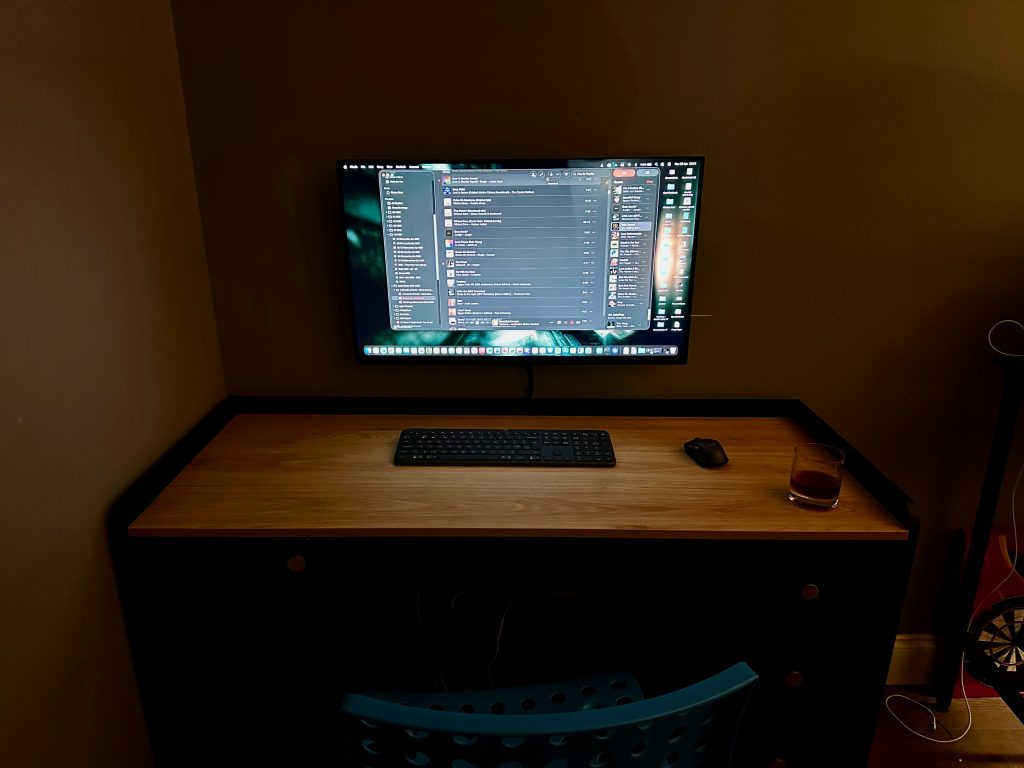
The Gear That Made It Happen
To keep things under budget, I had to be smart. I skipped the posh, overpriced docking stations and went for a modular setup using UGreen hubs and chargers. It’s tucked away, tidy, and works perfectly.
For the screen, I found the Samsung ViewFinity S7. At 32 inches, it is massive. Being able to have my emails, a browser, and a project open all at once without squinting feels like a superpower. If you’re still working on a small laptop screen, trust me—this is the upgrade you actually need.
I finished it off with the Logitech Signature Slim keyboard and mouse. It’s quiet, feels premium, and lets me switch between the Mac and my phone with one tap.
The Damage
Here’s the best bit. Even with the nice peripherals and the big 4K display, the whole lot came to £963.46.
- MacBook Neo: £599.00
- 32″ 4K Monitor: £219.00
- Logitech Keyboard/Mouse: £79.99
- The Hubs & Cables: ~£65.00
Why I’m Chuffed
We often think we need to spend thousands on “Pro” gear to get a great experience, but we really don’t. This setup handles everything I throw at it—from daily life admin to creative projects—with zero friction.
It’s simple, it’s clean, and it just works. If you’ve been thinking about upgrading your desk, stop overcomplicating it. This is the “sweet spot” setup that most of us actually need.